

AdSuiteMarket News
Your news about AdSuite Market
On our news page you will find all information about AdSuite Market from the last 6 months!
New Features as of Version 2024.10
Search for ad specs with a specific order document language
It is now also possible in ASE to search for the order document documents_language for the result types orders, order items and invoice sub-items. For this purpose, thedocuments_language’ field has been added to the search window on the ‘Header data’ order tab:
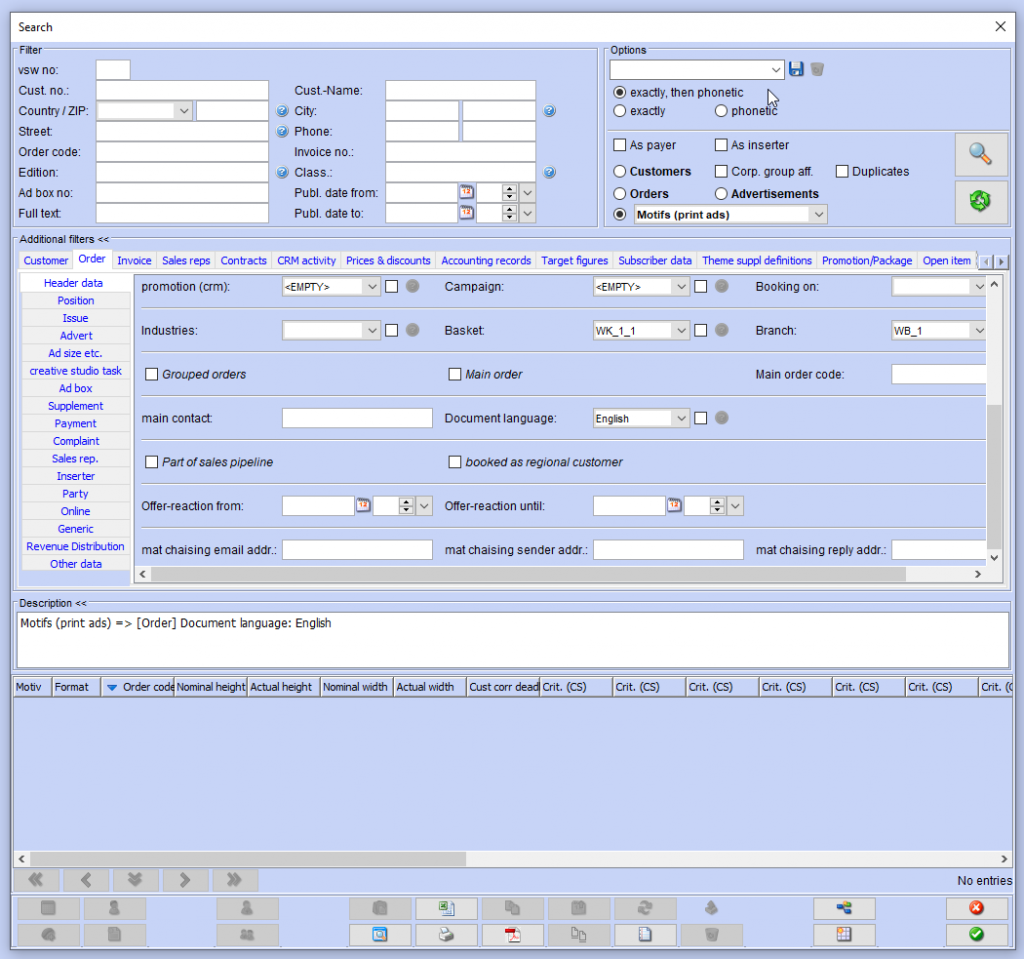
In addition, you can now search for ad specs (ad specs (all) and ad specs (print ads)) with a specific order documents_language language in ASE and ASM.
Selection of the publisher IBAN during billing
The functionality of AdSuite has been extended to allow you to select at customer level which publisher’s bank account should be used for invoicing:
- The ‘Publisher IBAN’ option has been added to the administration of the criteria. This option identifies the criterion for selecting the publisher IBAN. It is intended for a criterion with characteristics (e.g. UBS, BCV).
- For customers without this criterion, the default behavior remains unchanged, i.e. the publisher’s preferred bank account is selected for invoicing.
- For customers who have a value in this criterion (e.g. BCV), this value is compared with the value in the ‘Comment’ field of the publisher’s bank accounts. If there is a bank account with a comment that matches the text of the criterion, this bank account will be used for invoicing.
More information: Doku-Wiki.
New Features as of Version 2024.9
Order item criteria for booking rooms
The lists (search results, workflows and reports) for the „booking areas“ result type have been extended so that order item criteria can also be used as columns via configuration. The content of these columns is determined by the criteria values of those order items that have been placed in the corresponding booking areas.
Information on the customer correction deduction in the service overview
Information on the customer correction deduction is now displayed in a new line in the service overview. If there is no customer_correction yet, it is indicated whether it is required. Otherwise, it is indicated by when a confirmation must be made or whether and when a confirmation has already been made.
Deleting users
AdSuite users that are referenced by a campaign, an export configuration, an ASM custom position view or a sales function can only be deleted once the references have been removed.
If other references still exist, these are listed before deletion and the user is asked whether the user should be deleted.
You can find more detailed information on this in our Doku-Wiki.
New Features as of Version 2024.8
Additional online publication for print advertorials
If the online checkbox is activated for an advertorial, the online start and end dates are also transmitted to Contentline in :
Issue.onlineStartdateIssue.endDate
For combination, this data is only transferred for the main part.

Configuration of the e-mail for customer proofs
The email for the correction customer_correction could already be configured flexibly. An extended configuration option is now available. Similar to quotations and order confirmations, the customer proof email can be designed with all fields of the Motifs result type.
The corresponding functions are available in the StyleSheets tab of the Publisher Administration.
The existing customer_correctionemail proof and customer proof fields can be found in the proof section. The option to define the HTML template for email in the desired language has been added. If this specification is available, the previous specification is not used.

Several alternatives can also be defined.

The alternatives can be selected when creating a correction proof.


Use user e-mail address for proofs
The configuration of AdSuite users has been supplemented by a new option Use e-mail address for customer_correction (default value: deactivated).

If this option is activated for a specific user, the e-mail address of the currently logged-in AdSuite user is automatically entered as the recipient e-mail address for the customer_correction when a proof is created. It can then be changed if necessary.
New Features as of Version 2024.7
Deadlines as filters for online ads
The relevant cut-off dates (including in particular the print deadline) have been provided as filters and in the results list for search results, reports and workflows of the type online ads in AdSuiteMarket and AdSuiteEnterprise.


Catchword in page and edition preview
In the AdSuiteMarket page and edition preview, the catch_word is now also displayed in the graphic for ads:

Customer-specific configuration for XML documents for ZUGFeRD invoices
New authorization: fieldZugferdXml – ZUGFeRD-XML field
The option described under‘ZUGFeRD/XRechnung documents in XML format‘ for generating the XML structure of ZUGFeRD documents as a separate file when issuing invoices has been extended so that a decision can now be made for each customer as to whether the XML file should be provided. In addition, you can specify whether only the XML file should be sent when sending invoices by email.
The new options ‘With ZUGFeRD-XML’ and ‘ZUGFeRD-XML only’ are available for this in ASE under Master data > Invoicing or in ASM under the customer portlet ‘Payment’.
The authorization ‘fieldZugferdXml’ is requested for both fields.
In the search dialog, the searching for both options can be restricted on the customer tab ‘Payment’ in ASE as well as in ASM. The ‘Customers’ result type has been expanded to include the two columns ‘With ZUGFeRD-XML’ and ‘ZUGFeRD-XML only’.
If the ‘With ZUGFeRD-XML’ option is activated, the ZUGFeRD-XML file is now transferred as an attachment in addition to the PDF file when the invoice email is sent. If the ‘ZUGDeRD-XML only’ option is also activated, only the ZUGFeRD-XML is sent as an attachment. In addition, the ‘Attach additional files’ button appears in the email window, which can also be used to attach the PDF file if desired.
In addition, the fields in the ‘Customer’ result type are provided as table columns and search filters and are taken into account when import and export orders.
Improvements to the UI of the ASM filter dialog
The following improvements have been made to the UI of the ASM filter dialog:
- The white space between main filter settings and options„(As payer“ etc.) has been eliminated
- The selection of the result type has been moved to the toolbar in the menu itemsearching for’ and can now be selected from there.
- Individual result type menus can be positioned as buttons in the toolbar via the configuration configuration.
- The buttons for the result types ‘Customers’ and ‘Orders’ as well as the button for ‘searching for’ are configured by default so that they are visible in the toolbar.
- The button for the searching search has been added to the toolbar menu.

Search for a filter field in the search mask
In the event that the user does not immediately know on which tab card the filter field has been placed, it is now possible to search for the filter field or filter criterion using thesearching filter field’ button. After entering at least three characters, the corresponding suggestions are displayed. Clicking on the entry you are looking for opens the corresponding tab card and briefly displays a red frame around the field.

Specifications for the e-mail dispatch of material requisitions
The AdSuiteMarket order portlet „Miscellaneous“ is supplemented by an area for entering specifications for sending material requests.

This area includes the following new fields, which are intended to enable extensive automation of the dispatch of material requisitions. The field right materialChasingDataInOrderHeader is required for displaying or editing.
Recipient e-mail
This field is not pre-assigned with content for new orders. As a selection option in an associated drop-down box, all email addresses for the client and advertiser of the order are listed, with addresses with the purpose of „material request“ being placed at the top of the selection. The order processor has the option of entering a different e-mail address that is only relevant for the current order. This is not automatically transferred to the customer master data. For newly created material requests or those generated automatically via the associated order order, this e-mail address is used automatically if it has been specified; otherwise the current mechanism, which selects an appropriate e-mail address from the customer master, is used by default. A new plausibility check(default setting for material request email address missing) is provided to ensure that a recipient email address has been specified in the order in as many orders as possible for which a material request is expected. This becomes active if the order contains at least one production_detail that is in a status for which the check has been activated (new option in ad spec status management, see below).
Reply e-mail address
A new default option has been defined in the publisher settings (see below Default reply address for material request), which is transferred to this field for each new order. The processor can overwrite the content of the field in the order with any other e-mail address; no suggestions are made, so only a text field, not a drop-down box, is provided here. If the field is empty, the previous default mechanism is used when a new material request is created.
E-mail sender address
By default, the e-mail address of the currently logged in user is entered here. It can be overwritten with any e-mail address. Here too, the system does not provide any other suggestions. An empty field also leads to the use of the previous standard here.
New option in the management of ad spec statuses
Whether the above-mentioned plausibility check is to be carried out can be stored in the ad spec status.
Notes: It is not intended to populate one of these fields with multiple e-mail addresses; instead, only one e-mail address should be entered per order and field.
All new fields mentioned here are only available in AdSuiteMarket, not in AdSuiteEnterprise.
The new fields are available in order table columns and can be used as filters when searching for orders.
Integration of graphics / comments in annotation mask
When processing the customer correction proof via the browser annotation mask, a PDF document will be generated in future which, in addition to the graphic for display graphic for display as well as the customer’s comments. These embedded in the PDF document so that they can be extracted by copy & paste. can be extracted.
Display of contact person functions
In the overview of all contact_person for a customer, the job description according to the business card was previously displayed directly below the contact_person. If no such designation was entered for the contact contact_person, the content of the „Function“ field was displayed instead.
This functionality has now been extended so that the content of a textual contact_person is displayed at this position instead if neither of the above fields has any content.
An option has been added to the configuration of the criteria to determine which of the contact_personcriteria should provide the desired content.
New Features as of Version 2024.6
Cipher in the motif copy profile
The administration of motif copy profiles has been expanded to include the option of resetting the cipher ad_box.

Online properties of Stylo templates extended to include text flow for keyword
The online properties of Stylo now offer the option of defining a user field from which the order keyword can be preset.

Invalidate obsolete users
Obsolete users cannot always be deleted, as they may still be referenced in other objects. As a workaround, such users can now be marked as „invalid“, as is already the case with many other objects.
In the case of invalid users, Tsapi is also deactivated and any existing CreateX users are invalidated. Invalid users can no longer log in.
This also applies to Satzstudio employees who are directly linked to invalid AdSuite users. When using the user in CreateX, the validity of the optional AdSuite user is also taken into account.
In some places, invalid users can no longer be selected (e.g. for CRM or offers/order confirmations).
Otherwise, invalid users are usually sorted at the bottom of lists.
For more information, visit our Doku-Wiki.
Opening folder documents
If documents documents or images are to be displayed from a document folder in ASM, these must currently always be downloaded first and then opened manually.
Now the files can be loaded via a separate button and automatically displayed in a new browser tab.
Suggestions with additional option “Continue with current value”
If a plausibility check leads to a warning and there are several suggestions for the solution, from which one can be selected, it is now also possible to continue with the new option “Continue with current value” instead of one of the suggested solutions.

Post-processing for WebStore orders
For more efficient post-processing of orders entered via the WebStore within the AdSuite Market environment, a new „Customer system note“ column has been added to the „Orders“ result type. This contains the content documented under Post-processing of online customers for the „Customer“ result type, in relation to the client of the respective list entry. Notes of the type „duplicate“ or „duplicate candidate“ have been implemented as a link which, when clicked, leads directly to the „Customer/Other“ portal area, so that a duplicate merge can be started here if necessary.

Changing the insert delivery location
In the AdSuiteMarket performance overview, it is also possible to change the delivery location for an insert without having to open the insert first.
New Features as of Version 2024.5
Motif details for proof email
The following parameters have been added to the parameter list for more flexible design of proof emails:
- Subject: Subject production_detail as parameter {6}
- E-mail text/second variant: Motif catch_word as parameter %PRODUCTIONDETAILCATCHWORD%
Standard salutations
Configuration
The standard salutations for women, men and companies can now be stored in the client under „configuration“:
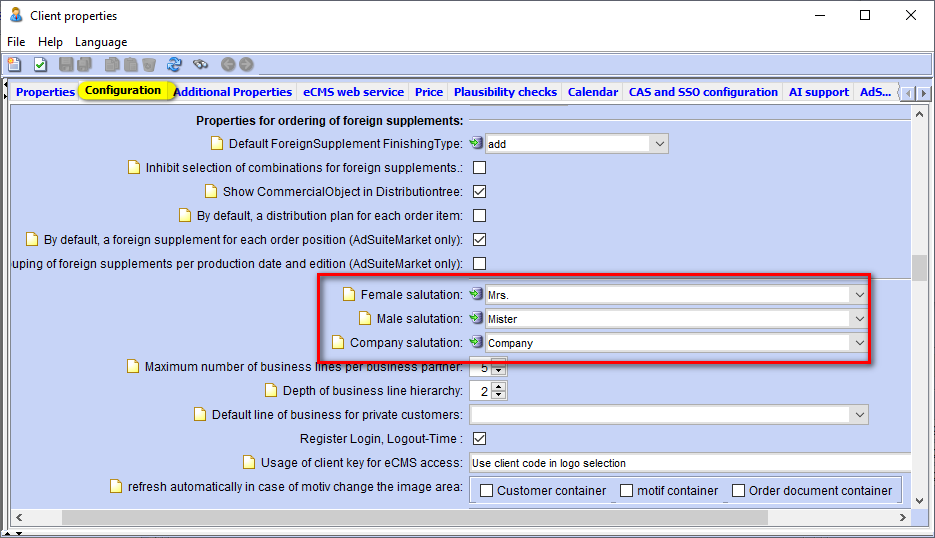
When version 2024.5 is installed, these are automatically pre-assigned with the salutations „Mrs.“, „Mister“, „Company“.
AdSuite Enterprise
These standard salutations are used as default settings when a new customer is created in the quick entry screen in AdSuite Enterprise. This is done in the following order:
- If a female first name is entered, the female salutation is used.
- Otherwise: If a male first name is entered, the male form of address is used.
- Otherwise: If the customer_type is not a „private individual“, the salutation for companies is used.
AdSuiteMarket
If a customer is created in AdSuiteMarket using the Data from website function, the salutation is pre-assigned with the salutation for companies if the customer is not recognized as a private individual.
In addition, the salutation of the contact_person is now pre-assigned from the first name using the integrated first name table.
Supplement-specific extensions to the motif copy profile
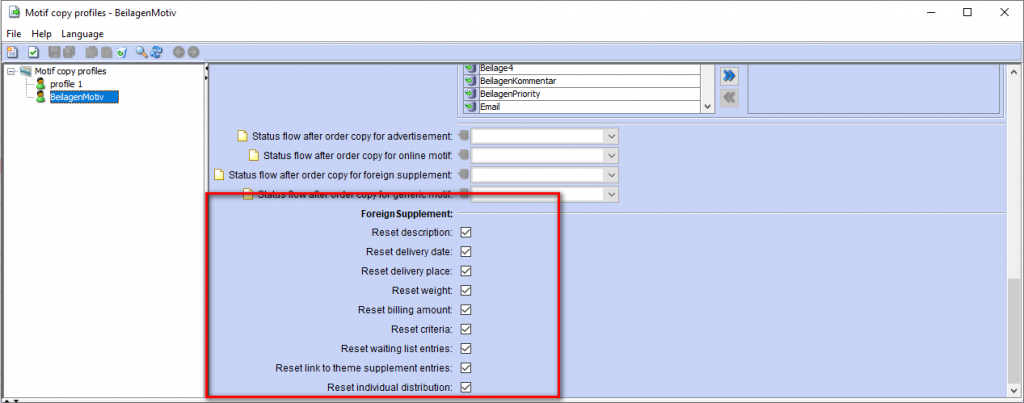
The following options have been added to the motif copy profiles for use when copying inserts:
- Reset description
- Reset delivery date
- Reset delivery location
- Reset weight
- Reset quantity to be invoiced
- Reset insert criteria
- Reset waiting list entries
- Reset individual distribution
Date and billing status specification in package definition
The following options are provided when configuration package components:
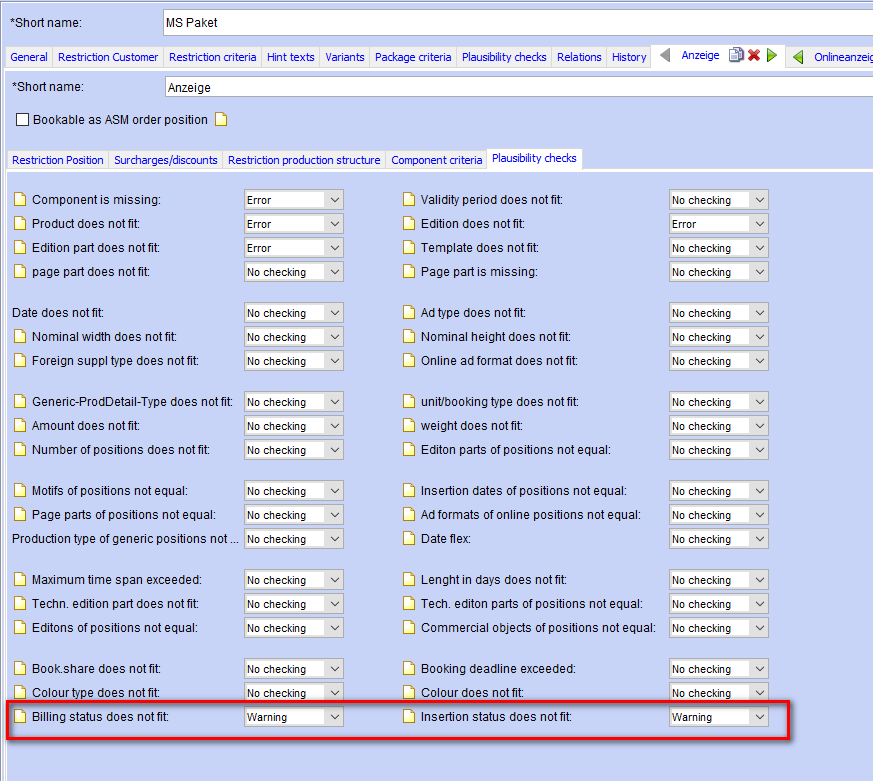
- Optional specification of a billing status for the created order item. This billing status takes precedence over other rules (e.g. billing block in the customer master).
- Optional specification of a deadline status for the order item created. Depending on the service type of the package component, this is either a deadline status for ad items, online_positions, insert items or free items.
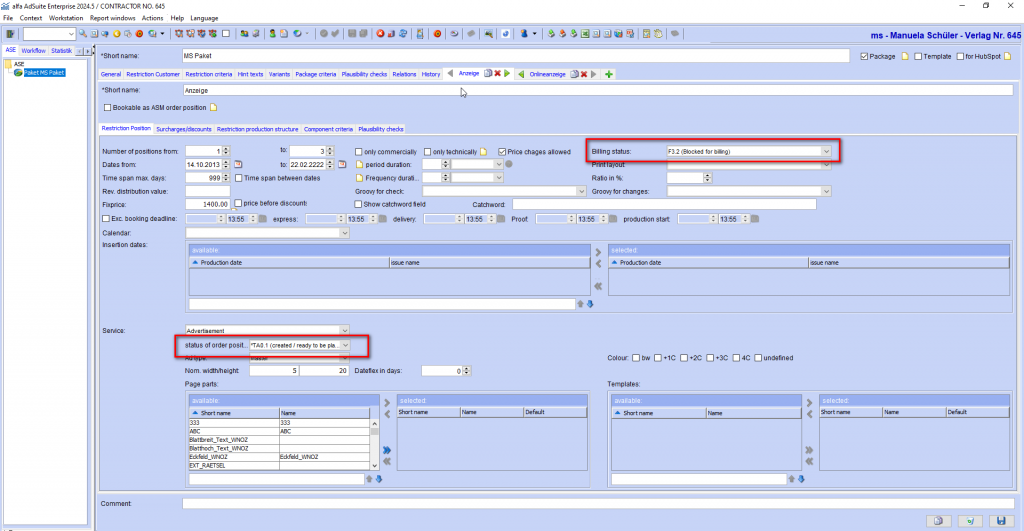
In the plausibility settings, you can set for the billing and deadline status whether a different billing leads to an error or a warning or whether it should be ignored when checking before saving an order.
Configuration of workflow e-mails for collectives
Two new variables for integration into the HTML text are provided for the configuration of e-mail content for workflow entries for collectives or changes:
- „all dates“
- „future dates“ (based on the time of email creation)
The content of these variables consists of the dates of the collective appointments, without duplication, sorted in ascending order and separated by commas.
New menu functions for booking print items in ASM
New menu functions are now available in reports and the search result lists of the types order items (only for print items), advertisements, motifs (all) (only for print motifs) and motifs (print advertisements).
New position for motif in existing order
A new item is to be created for the selected production_detail spec in the existing order. The booking data is pre-assigned with the data of the selected item ( order item or ad result type) or the first item of the ad spec. If the booking_deadline the publication date has already passed, the next possible date is suggested. Finally, the booking interface is displayed.
New order with motif copy
This creates a new order for the customer of the existing order. A new item is then created for this as described above.
Collective change of CRM activity times
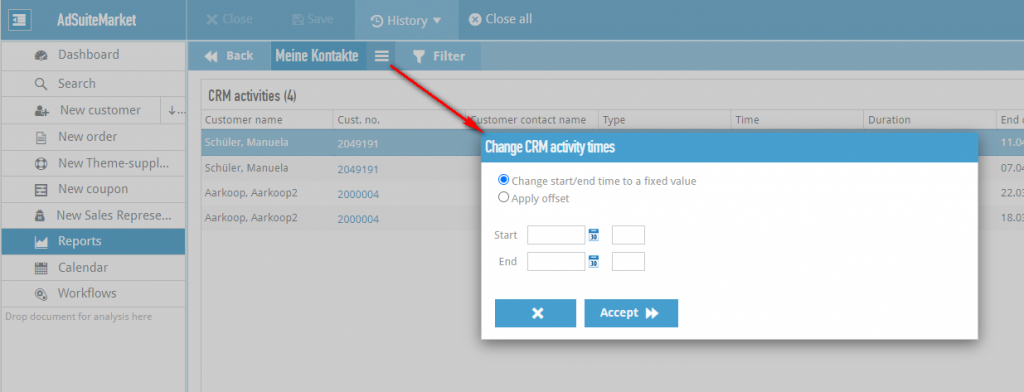
As with additional batch functions in reports, ASM has been extended to include the „Change“ CRM „CRM“ times report action, which can be configured for reports of type „CRM“.
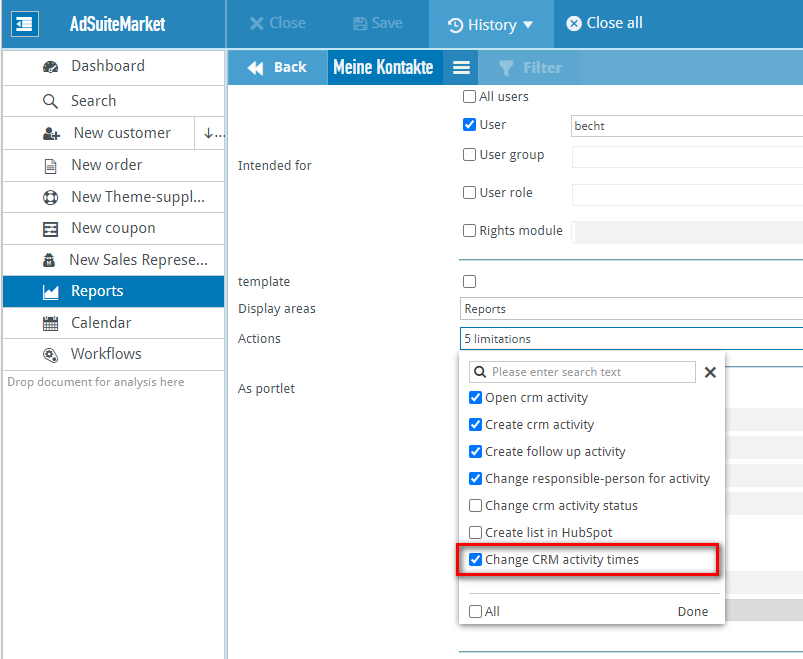
The following options are available when applying to selected CRM:
- Change start/end time (sets date + time to a fixed value)
- Apply an offset (e.g. -1 and ‘Current date’ to move the date forward by one day (e.g. from tomorrow to today), or 2 and ‘Week current date’ to move the date back by 2 weeks (e.g. from today to in 14 days))
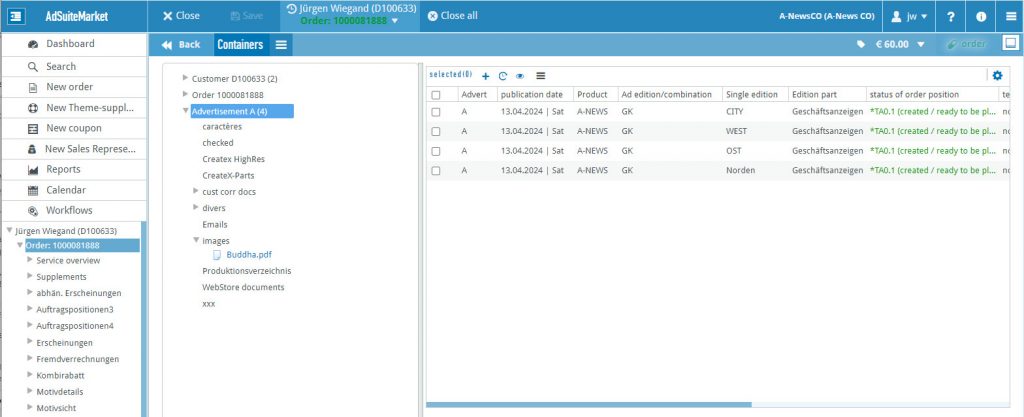
Information on ad spec usage when selecting an ad spec in the folder
If an ad production_detail is selected in the tree of the containers, the list of order items for this production_detail now appears in the right-hand area in the same way as the Appearances tab in the service overview. The buttons for restricting the items to be displayed are available, but the button for adding new items and the menu with additional actions are not offered.
Adopting changed distribution plans into other distribution plans
If several inserts with the same structure were created in an order and the distribution for one insert was subsequently changed, it is now possible to apply the changed distribution to the other spreading plans via the menu item ‘Adopt spreading plan distribution’.
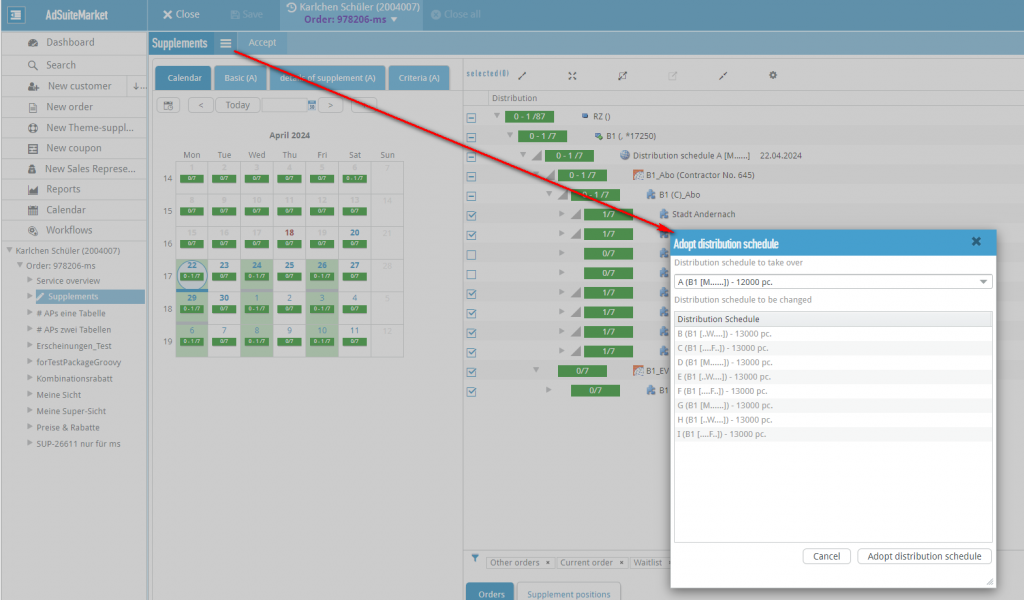
If a spreading plan is assigned to an invoiced item, it is not offered in the table.
In addition, the first Date is displayed in brackets next to the insert in the menu.
Configurability of the table under Performance overview -> Appearances
The table of items of the selected motif on the Appearances tab can now be configured. The new module SchedCompListInAdPanelASM is used for this purpose. This is automatically created forward-compatible.
Show price abbreviation incl. price
The manual setting of the tariff price in the item list has been enhanced.
The drop-down list now contains the information in the following form.
Code (single price) [Price list no. | rate shortname | regfgn| Weekday validity] - Code of the tariff price
- Unit price in the specified currency (local or basic price depending on the order)
- Price list no.
- rate short name
- regfgn: Indication of regular or foreign price depending on the order
- Weekday validity
Example: mo-sa
mo-sa (€ 6.40) [9 | 4c | OP | Mo, Tu, We, Th, Fr, Sa]
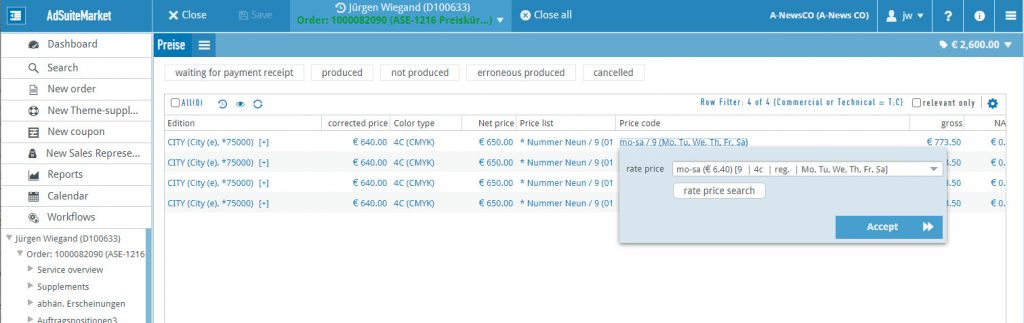
In addition, the tariff price search button has been introduced. It calls up the search dialog.
Transferring ad specs to HubSpot
In AdSuite systems with a HubSpot connection, a new configurable action „Transfer ad specs to HubSpot“ is now available for reports of the result types „Ad specs (all)“ and „Ad specs (print ads)“. This can be applied to a list of selected rows in the reports, provided they belong to orders in the current sales context.
The following is generated in HubSpot as a result of the action:
- A new company field with an internal name and an interface name, which must be specified when the action is started. AdSuite ensures that the character string specified for the internal name corresponds to the HubSpot restrictions for field names. This field is used to include a URL to the production_detail stored in HubSpot for each advertiser affected by the report. The field is assigned to the „adsuite_motive_urls“ group, which is also created automatically if required.
- A file folder with the internal field name, in which subfolders with the AdSuite customer numbers of all affected advertisers are created. These subfolders each contain the production_detail transferred for the customer as an image file. The folder with the internal field name is created within an „AdSuite motifs“ folder created at the top level.
- A note with the field name as text and the transferred image as an attachment is created for each advertiser concerned in their activity overview.
The images transferred in this way can be used in marketing emails as a link or as an embedded image by using an HTML block in which reference is made to the internal field designation at the customer:
<p>You used this advert motif in our last campaign on this topic:<br/><br/></p>
<p align="justify">
<img src=" {{company.<INTERNAL_FIELD_NAME>}}">
</p>